01
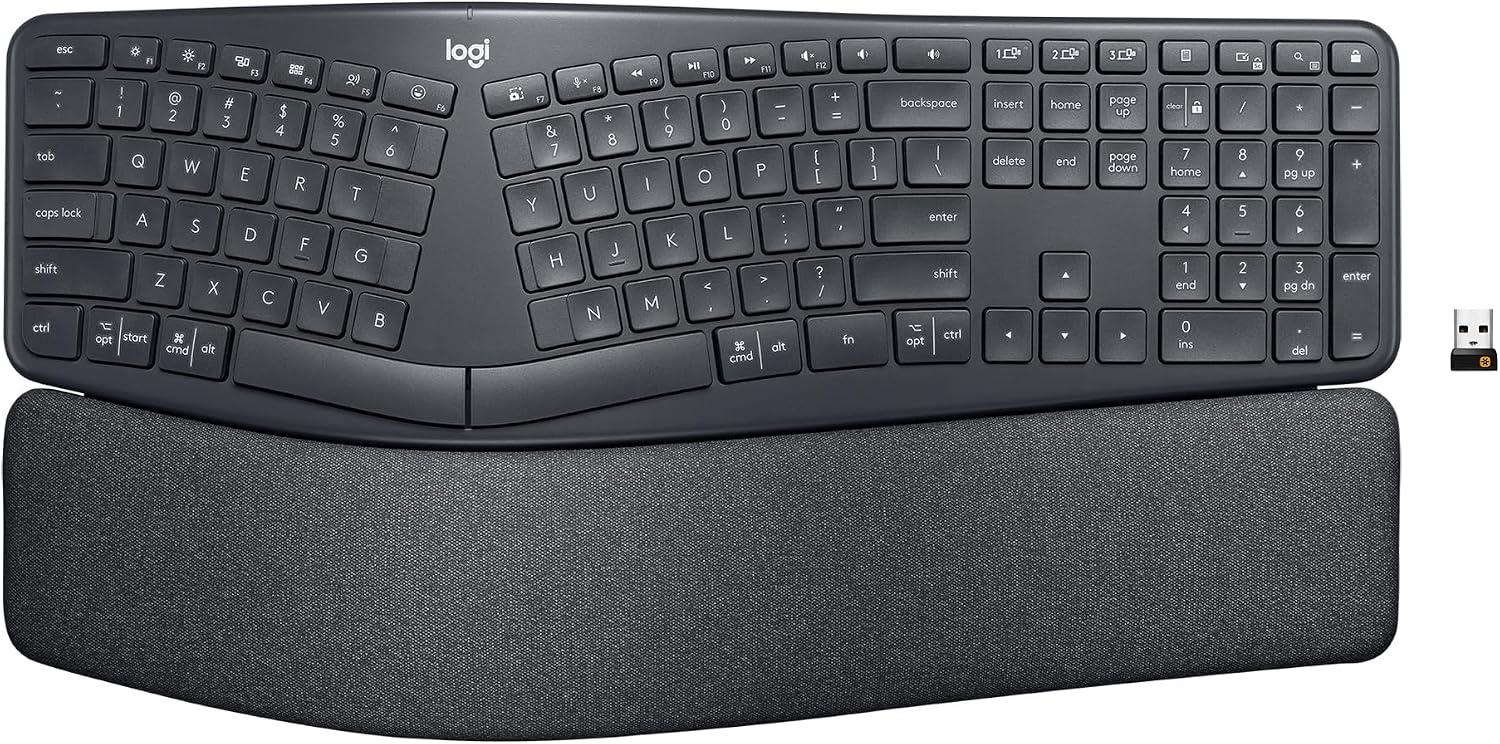
Improved Typing Posture: Type more naturally with a curved, split keyframe and reduce muscle strain on your wrists and forearms thanks to the sloping keyboard design
 70% off1 / 6
End of year sale
Logitech · Computer Accessories
You save $104.99
In stock for the end-of-year sale
Free US delivery by if you order today
Easy return before 20 December
Zero shipping charges
Brand authenticity certificate with the product
3 years warranty, if applicable
$45.00
$149.99Current price on Amazon.com
The details
01
Improved Typing Posture: Type more naturally with a curved, split keyframe and reduce muscle strain on your wrists and forearms thanks to the sloping keyboard design
02
Pillowed Wrist Rest: Curved wrist rest with memory foam layer offers typing comfort with 54 per cent more wrist support; 25 per cent less wrist bending compared to standard keyboard without palm rest
03
Perfect Stroke Keys: Scooped keys match the shape of your fingertips so you can type with confidence on a wireless keyboard crafted for comfort, precision and fluidity
04
Adjustable Palm Lift: Whether seated or standing, keep your wrists in total comfort and a natural typing posture with ergonomically-designed tilt legs of 0, -4 and -7 degrees
About this piece
Type more naturally with ERGO K860 - an advanced ergonomic keyboard that promotes a more relaxed typing posture – reducing wrist bending by 25% and offering 54% more wrist support. The curved, split keyframe reduces muscle strain on your wrists and forearms. And the pillowed wrist rest offers comfort and the optimal ergonomic position. The adjustable palm lift feature keeps your wrists in a natural posture, whether you're seated or standing. You’ll confidently type on Perfect Stroke keys—crafted for precision and fluidity. And an integrated numpad, multi-device capabilities, and two-year battery life ensure that you won’t compromise performance for ergonomics.
Year-end saving $104.99
Buyers
4.4
8,097 ratings
Premium Logitech Ergo K860 Keyboard – Comfortable, High-Quality, Great for Windows & Mac Users
• Premium build quality: Solid, high-end feel; slightly heavier than budget keyboards, giving a luxurious and durable impression. • Ergonomic design: Wide, pronounced curve reduces shoulder and wrist strain; encourages natural, open posture. • Key comfort: Height and layout feel great for both Windows and Mac users. • Better than cheap keyboards: The curve and overall design are noticeably superior; you can r
Best keyboard I've ever used
I've been using it for about a month now and so far it's doing me a lot of good. I've had to kind of re-learn the key positions because of the keyboard's design, but I knew I'd have to do that going in. I have carpal tunnel syndrome and another diagnosed neurological condition that make it hard for me to both type correctly and to type for any length of time. So far the keyboard has worked out well for me and my t
Finally something competitive from Logitech
Although I've had a number of Logitech mice over the years, this is the first Logitech keyboard that I can recall ever buying for myself. It's replacing a Microsoft Sculpt wireless keyboard that I really liked. I loved the simplicity of the Sculpt and have been used to that split design after many years with MS's natural keyboards. Logitech, for as long as I can recall, has never had a good competitor in that basic,
Two years of heavy use - still love it
I’ve used various Microsoft ergo keyboards over the last 20 years at the office and needed one when started WFH with my own equipment a few years ago. I have this and also use the logi MX Master 3 mouse. Reading thru the 1-star reviews, I wanted to chime in with a five-star. First off: Ergonomic keyboards take some getting used to. My hands tend to figure it out fine after a week or two. Might take you longer. It
Incredible comfort and wrist support, but frustratingly lacking in setup instructions
Making the jump from a standard flat keyboard to a split ergonomic design is a significant transition. After experiencing some wrist fatigue, I decided to invest in the Logitech Ergo K860. At its current price point, it is definitely a premium investment. While it absolutely delivers on its promise of physical comfort, the out-of-the-box setup experience leaves a lot to be desired. Here is my detailed breakdown after
Great key action, but: (1) locks up, (2) toggling media vs. F keys sucks, (3) no right-mouse menu
UPDATE 2 (7 Aug 2021, ~7 months into ownership). I found the Microsoft context-sensitive menu pop-up key -- equivalent to the right mouse button -- of the MS EP4000. See picture. I don't love this location. But at least it exists. I'm moderately used to it's weird inaccessible placement. But I do have to always look to find it, instead of knowing it's location by muscle memory, like most keys. I probably should
Keep browsing
 −70%
Logitech
 −70%
Logitech
 −70%
Logitech
 −70%
Logitech


