01
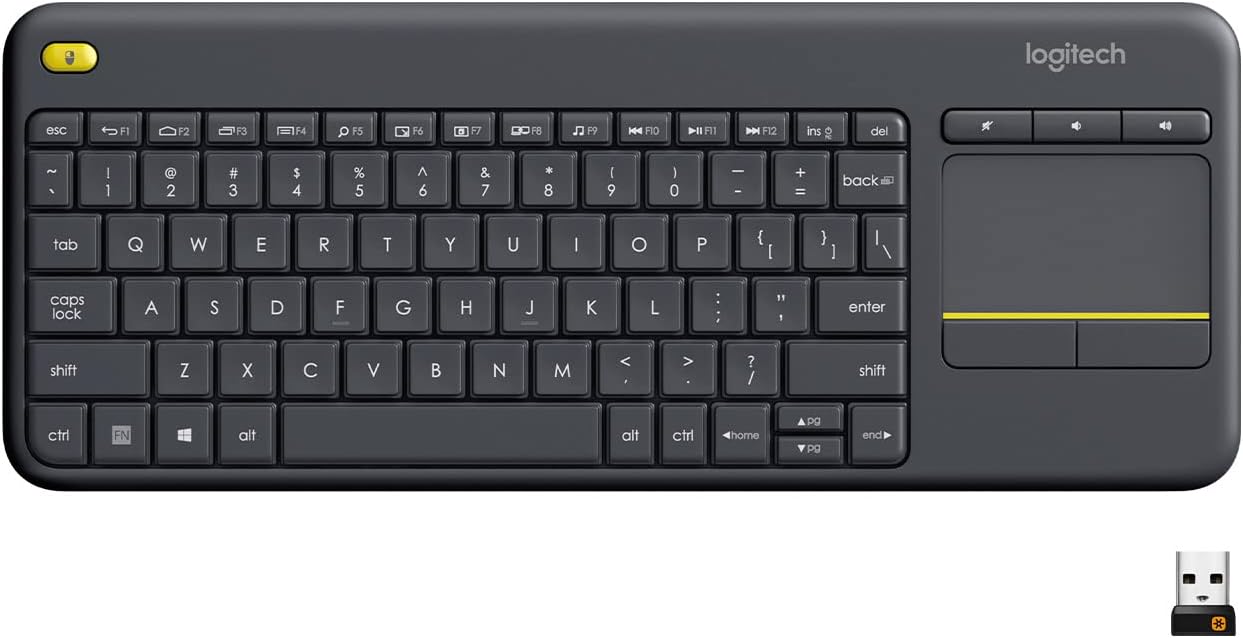
Media-Friendly: The K400 Plus wireless touch TV keyboard gives you integrated, comfortable control of your PC-to-TV entertainment, eliminating the clutter of a separate keyboard and mouse
 70% off1 / 6
End of year sale
Logitech · Computer Accessories
You save $24.49
In stock for the end-of-year sale
Free US delivery by if you order today
Easy return before 20 December
Zero shipping charges
Brand authenticity certificate with the product
3 years warranty, if applicable
$10.50
$34.99Current price on Amazon.com
The details
01
Media-Friendly: The K400 Plus wireless touch TV keyboard gives you integrated, comfortable control of your PC-to-TV entertainment, eliminating the clutter of a separate keyboard and mouse
02
Plug-and-Play: Simply plug the Unifying receiver into a USB port and the wireless touchpad keyboard is ready to go; adjust controls using the Logitech Options Software to save preferred settings
03
Power-Packed: Built with laid-back control in mind, this wireless TV keyboard has a reliable and long battery life of up to 18 months (2), including an on/off button to help it go even longer
04
Wireless Freedom: Designed for seamless comfort and control, this HTPC keyboard boasts a range of up to 33 ft (1) wireless connectivity, with quiet keys and a large touchpad for easy navigation
About this piece
The Logitech Wireless Touch Keyboard K400 Plus lets you experience PC-to-TV entertainment the way you Watch video, browse the web, chat with friends and much more. The all-in-one keyboard with touchpad ends the hassle—and clutter—of multiple devices. And a 10-meter (33-foot) wireless range ensures your fun won’t be interrupted. Comfortable, quiet keys and a large (3.5-inch) touchpad make navigating entertainment effortless. Even setup is a snap thanks to the tiny, plug-and-play Unifying receiver. The 18-month battery life means you might even forget the keyboard needs batteries. 1 Wireless range may vary depending on operating environment and computer setup. Assumes up to two hours typing per day. Actual battery life will vary with use, settings and environmental conditions.
Year-end saving $24.49
Buyers
4.4
40,618 ratings
Works great on iPad
Purchased this to use on my iPad Air to type when I'm not home and it's been great so far. It's completely made of plastic so it feels a little cheap, but it doesn't feel like it'll break at all and is very light, useful for sticking in my bag. It's a perfectly affordable and functional keyboard. I chose this for the track pad placement, physical clicker buttons, and because I never have issues with Logitech. Would r
Love it
I've tried numerous "media Center" style keyboards.... Some with backlight, some without, some with specific freq receiver and some bluetooth. The thing about all those I've tried, the keyboards are tiny rubber keys and a small touchpad. Now to be fair the main reason I've tried so many different ones is because they all fail the same way... the legend comes off the rubber keys, the touchpad becomes so glossy smooth
Good keyboard
In my experience, Logitech makes good wireless peripherals, and I think this keyboard is no exception. It is small, relatively speaking, uses two AA batteries for power, has a power switch on the side that clearly let you know whether it’s turned on or off, and it goes to sleep after a while if it hasn’t been touched. The typing experience is average for a keyboard of this kind, so it is not going to blow your socks
Perfect for use with my Samsung Smart TV
I have two 6 Series (MU6290) 40" Samsung 4K Smart TVs that I purchased at Costco, one in my office and the other in my master bedroom. For about $19 I purchased a wireless keyboard and mouse combo on Amazon to use with the TV in my office. They use a single unifying USB reciever and work great, just plug and play. The only thing I found I didn't like was having two devices to keep track of and having to switch bet
Logitech once again delivers a fantastic product!
So I’ve had my Xbox Series X since it launched November 2020, and have been considering purchasing a wireless keyboard to solely use with it. Here recently more and more developers are including native keyboard and mouse support in their games, so the benefit of having a keyboard to use is growing. Since I did not plan to actually “play” the games with the keyboard, but instead use it for “QOL” enhancements, I didn’t
Oops. Did Not Realize It NEEDED The USB Dongle
I already owned a small bluetooth keyboard I had bought for use with my Kindle tablets. I have a few 10in tablets that I sometimes use to connect remotely to my main desktop PC. The setup works incredibly well when you pair the tablets with a wireless keyboard and mouse. I bought this additional bluetooth keyboard because there are times I'd like a keyboard, but don't want to have to deal with a separate mouse. Pl
Keep browsing
 −70%
Logitech
 −70%
Logitech
 −70%
Logitech
 −70%
Logitech


