01
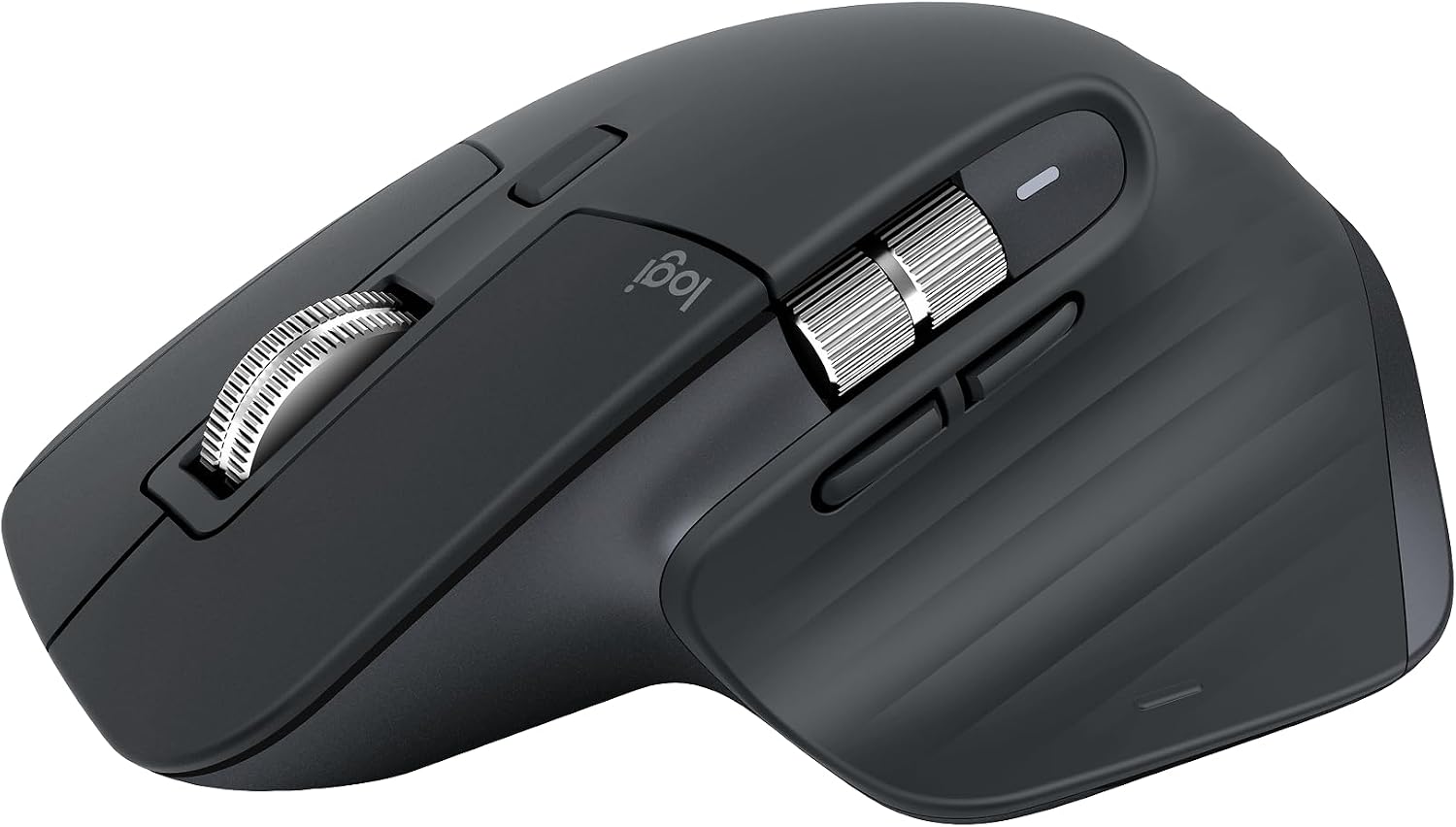
Logitech MX Master 3S Bluetooth Edition is a Bluetooth only mouse, and does not come with any USB receiver / adapter or charging cable
 70% off1 / 6
End of year sale
Logitech · Computer Accessories
4.6830 reviews
You save $69.99
In stock for the end-of-year sale
Free US delivery by if you order today
Easy return before 20 December
Zero shipping charges
Brand authenticity certificate with the product
3 years warranty, if applicable
$30.00
$99.99Current price on Amazon.com
The details
01
Logitech MX Master 3S Bluetooth Edition is a Bluetooth only mouse, and does not come with any USB receiver / adapter or charging cable
02
8K DPI Any-surface tracking: Use MX Master 3S cordless computer mouse to work on any surface - even glass (1) - with an 8000 DPI sensor with customizable sensitivity
03
Quiet Clicks: MX Master 3S Bluetooth mouse with Quiet Clicks - offering the same satisfying feel but with 90% less click noise (2)
04
Magspeed scrolling: A computer mouse with remarkable speed, precision, and near silence - MagSpeed scrolling is 90% faster (3), 87% more precise (4), and ultra quiet.
About this piece
Logitech MX Master 3S Performance Wireless Mouse Logitech MX Master 3S Bluetooth Edition – productivity and precision mouse. With Quiet Clicks(2) and 8K DPI any-surface tracking for more feel and performance. Product details: Weight: 4.97 oz (141 g) Dimensions: 2 x 3.3 x 4.9 in (51 x 84.3 x 124.9 mm) Compatible with Windows, macOS, Linux, Chrome OS, iPadOS, Android operating systems (8) Rechargeable Li-Po (500 mAh) battery Sensor technology: Darkfield high precision Buttons: 7 buttons (Left/Right-click, Back/Forward, App-Switch, Wheel mode-shift, Middle click), Scroll Wheel, Thumbwheel, Gesture button Wireless operating distance: 33 ft (10 m) (9) Footnotes: (1) 4 mm minimum glass thickness (2) Compared to MX Master 3, MX Master 3S has 90% less Sound Power Level left and right click, measured at 1m (3) Compared to regular Logitech mouse without an electromagnetic scroll wheel (4) Compared to Logitech Master 2S mouse with Logitech Options installed and Smooth scrolling enabled (5) Requires Logi Options+ software, available for Windows and macOS (6) Logi Bolt USB receiver not included. Not compatible with other Logi USB receivers. (7) Battery life may vary based on user and computing conditions. (8) Device basic functions will be supported without software for operating systems other than Windows and macOS (9) Wireless range may vary depending on operating environment and computer setup (10) Excludes plastic in printed wiring assembly (PWA), receiver, wire, FFC cable, and packaging.
Year-end saving $69.99
Buyers
4.6
830 ratings
An upgrade coming from an M720 Triathlon; easy to mouse-fu
I've owned, used, and abused M720 Triathlons for years. Never thought I would need another mouse, honestly. But of course, curiosity got the better of me and after a good bit of research, I told myself, why not? Bought it used and of course, this Bluetooth version. BT makes it super nice and simple to pair it up without worrying about losing a receiver. It came charged at about 55ish% so I could at least immediately
Excellent mouse, awful software which, fortunately, can be replaced
Bought this mouse to replace an MX Master 2, which started to show signs of wear and disconnect for nor apparent reason. The new mouse stays connected and is more comfortable than its predecessor and works longer on a charge. Logitech Options+ software is awful, in my opinion, but I replaced it a while ago with the BetterMouse app, which works seamlessly on my MacBook.
Tracks on Anything, Smooth as Butter, Great for Switching Between PCs
The MX Master 3S has been an awesome mouse. It’ll track on almost anything, it’s super smooth, and the multiple channels make it perfect for bouncing between workstations. I use it to switch from my home PC to my shop laptop, and that alone makes it worth it. The scroll wheel is top-tier—fast when you want it, controlled when you don’t. Ergonomics are great too. It fits my hand well and stays comfortable even when I’
Great for Design & Dev Work / No More Uncomfortable Magic Mouse
I tried out a cheap alternative and there’s really no replacing the quality and functionality that comes with the MX Master 3S. Was not expecting the Bluetooth to be as impressive as it is. Switching from one device to another is seamless. Customizations and ergonomics are fantastic. And the weight is just right. Not too heavy and not light. Chose this instead of the 4S since people said that one was on the heavy sid
Finally, a mouse with some self-respect
After a brief and disappointing relationship with a $170 esports mouse that felt like a hollow chocolate egg, I came home to the Logitech MX Master 3S. It was like going from dating someone who ghosts you to marrying someone who files your taxes. The first thing I noticed is that this mouse actually exists in physical space. It has weight. It has presence. When I pick it up, it feels like a real tool, not a party fav
Good Mouse, But Not a Game-Changer
I upgraded from the MX Master 2S expecting noticeable improvements, but honestly, I'm a bit let down. The 2S was fantastic, and this 3S doesn't feel like much of an upgrade. My biggest frustration is the software setup. Some customization options work perfectly in Chrome but completely fail in Photoshop. It's inconsistent and annoying when you're trying to optimize your workflow across different programs. The mouse i
Keep browsing
 −70%
Logitech
 −70%
Logitech
 −70%
Logitech
 −70%
Logitech


